
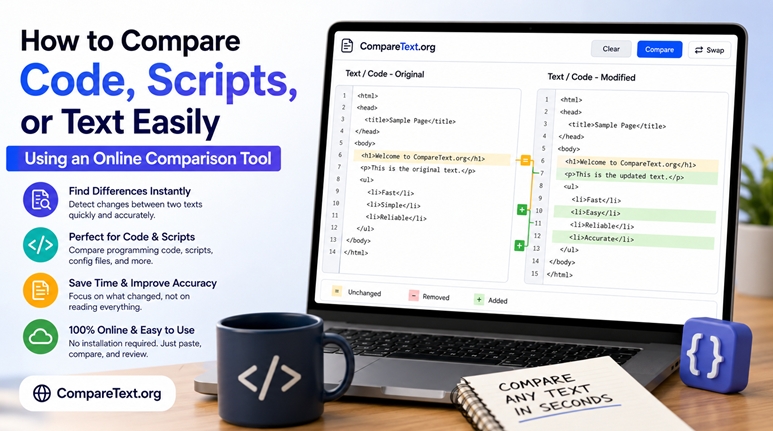
New York, United States - August 17, 2026 - CompareText.org, an online text comparison tool, provides users with a straightforward way to identify differences between two versions of text. The browser-based platform is designed to help developers, writers, editors, students, marketers and other users review changes without having to manually examine documents line by line.
As digital content increasingly goes through multiple revisions, identifying small changes can become time-consuming. A missing word, modified sentence, altered punctuation mark, or single-character change in a script can be difficult to spot through manual review. CompareText.org offers a simple workflow for comparing two pieces of content and identifying where differences occur.
Simplifying the Text Comparison Process
Comparing short pieces of content manually may be relatively easy, but reviewing longer documents, source code or scripts can quickly become more difficult.
Compare Text allows users to place two versions of content into a comparison interface and analyze them for differences. This can help users focus their attention on modified sections instead of repeatedly switching between documents or reading both versions from beginning to end.
For example, if one version states, "Online tools help developers review their code efficiently," while another says, "Online tools help developers compare their code efficiently," the change in wording can be identified more easily through automated comparison.
The same approach can be applied to longer documents containing hundreds or thousands of words.
Supporting Code and Script Reviews
Developers frequently work with multiple versions of source code as features are added, bugs are corrected and applications are modified. Finding the precise change between two versions can sometimes require detailed manual inspection.
An online text comparison tool can provide a convenient option for quick checks involving HTML, CSS, JavaScript, Python, SQL, configuration files and other text-based programming content.
CompareText.org can also be used when reviewing scripts. For example, an automation script may contain hundreds of lines while only a few lines have changed between versions. Rather than manually examining the entire script, users can compare the versions and concentrate on the areas where changes have occurred.
The tool is intended as a convenient comparison option and can complement more comprehensive development workflows such as version-control and code-review systems.
Comparing Articles and Documents
Text comparison also extends beyond programming. Writers, editors, students, teachers, marketers and other professionals often need to review revised versions of written material.
An editor may receive an updated article from a writer and need to determine which sections were changed. Similarly, a student may want to compare an early draft with a final version, while a website owner may need to review changes made to existing website copy.
CompareText can be used to compare articles, essays, reports, assignments, product descriptions, emails, documentation, website content and other text-based material.
By identifying differences between versions, users can more efficiently review whether changes affect clarity, grammar, meaning or overall content.
A Practical Workflow for Reviewing Changes
Using an online comparison tool involves a relatively simple process. Users can keep the original and revised versions available, paste the first version into one comparison field and add the second version to the other.
After running the comparison, users can examine the differences identified by the tool and evaluate each change in context.
For developers, this may involve determining whether a modified line affects functionality. For writers and editors, the review may focus on wording, accuracy, grammar, structure or meaning.
This approach can turn a potentially lengthy manual review into a more organized process.
Key Benefits of Online Text Comparison
Among the potential benefits of browser-based text comparison are:
- Faster review: Users can locate differences without manually reading both versions in full.
- Convenient access: Browser-based comparison can be useful for occasional reviews without installing dedicated software.
- Multiple use cases: The approach can be applied to code, scripts, articles, documents and other text-based content.
- Improved visibility: Small wording, formatting or character changes can be easier to identify.
- Flexible workflow: Users can incorporate comparison into writing, editing, development or document-review processes.
Who Can Use a Text Comparison Tool?
Developers are one of the primary audiences for text comparison because source code and scripts can undergo frequent revisions. However, comparison tools can also be useful across a range of other activities.
Writers can compare drafts before submitting work, while editors can review revisions made by contributors. Students and teachers can examine differences between document versions, and marketers can compare updated campaign materials.
SEO professionals may use text comparison when reviewing changes to website copy, while technical writers can compare documentation before and after software updates. Website owners can also review revised policies, FAQs, descriptions and other page content.
Making Content Review More Efficient
Digital content rarely remains unchanged. Articles are edited, scripts are modified, source code is updated and documents can pass through several versions before being finalized.
When differences are small, manually tracking every modification can be inefficient. Online comparison tools provide an additional way to identify changes so users can focus their review on the sections that have actually been modified.
CompareText provides a straightforward option for users who need to compare code, scripts, articles, documents and other text-based content. Whether the objective is troubleshooting a script, reviewing an edited article or checking two versions of a document, automated comparison can make the review process more efficient and easier to manage.
About CompareText.org
CompareText.org is an online text comparison platform designed to help users identify differences between two versions of text. The tool can be used for comparing code, scripts, articles, documents and other text-based content, providing a convenient browser-based approach for reviewing revisions and changes.
For more information, visit CompareText.org.
Media Contact
Company Name: Compare Text
Contact Person: Media Relations
Email: Send Email
Country: United States
Website: https://comparetext.org/